


Happy Clickin!
 |
| ClixGrid - ClixSense |


Though you still do not have enough referrals in ClixSense, you can still reach your minimum payout amount with so much ease! And this is with the help of ClixSense Tasks! I have been noticing that ClixSense almost always have easy-to-do tasks now, with every task worth $0.03 each!
Plus, if you have completed just 10 tasks for the day, you are already qualified for the Daily Bonus! Just do not forget to view at least 4 ads, 10 ClixGrid squares and one forum page, and all these were absolutely soooo easy to do!
$8 is the minimum cash out amount in ClixSense, but if you are a Premium member, it is much lower by $2! That's why is highly recommended to upgrade your membership to ClixSense no matter what. That is just one of the amazing perks of being a Premium member! ;)

Plus, if you have completed just 10 tasks for the day, you are already qualified for the Daily Bonus! Just do not forget to view at least 4 ads, 10 ClixGrid squares and one forum page, and all these were absolutely soooo easy to do!
$8 is the minimum cash out amount in ClixSense, but if you are a Premium member, it is much lower by $2! That's why is highly recommended to upgrade your membership to ClixSense no matter what. That is just one of the amazing perks of being a Premium member! ;)
Checklist Daily Bonus Winner!
And again, I was lucky to get the checklist bonus! For two straight days! This is on top of all the earnings you have made for the whole day through ad clicks, ClixGrid winnings, and tasks completed.
I was blessed to see a huge number of easy-to-do tasks last Tuesday, that were carried over until Wednesday, so I was able to reach the minimum number of tasks to be completed for both days, that's why I got the bonus! Amazing, huh? ;)


You just have to be very patient and consistent in this earning opportunity for you to earn more! Always check your ads available, click your ClixGrid, and check your tasks and offers from time to time.
Upgrading your account to Premium is also a good way to maximize your earning potential. For just $17.00, you can get more ads, more chances in ClixGrid, and a lot of other perks! And that is already for one whole year! Read all about it here.
I was blessed to see a huge number of easy-to-do tasks last Tuesday, that were carried over until Wednesday, so I was able to reach the minimum number of tasks to be completed for both days, that's why I got the bonus! Amazing, huh? ;)
You just have to be very patient and consistent in this earning opportunity for you to earn more! Always check your ads available, click your ClixGrid, and check your tasks and offers from time to time.
Upgrading your account to Premium is also a good way to maximize your earning potential. For just $17.00, you can get more ads, more chances in ClixGrid, and a lot of other perks! And that is already for one whole year! Read all about it here.
ClixGrid Winner
I have won in ClixGrid AGAIN! Below's the screenie! Check it out! =)

Join me at ClixSense today to get your instant money too! Click HERE, please. =)

Join me at ClixSense today to get your instant money too! Click HERE, please. =)
|
| JOIN CLIXSENSE NOW! FREE! |
ClixSense Daily Bonus
Just got a taste of ClixSense's Daily Checklist Bonus! Check this out!

Be sure to perform easy-to-tasks whenever they become available so you can enjoy a bonus too! On top of that, I also won at ClixGrid! Here's another photo! ;-)


Be sure to perform easy-to-tasks whenever they become available so you can enjoy a bonus too! On top of that, I also won at ClixGrid! Here's another photo! ;-)

There really are so many ways to earn in ClixSense! If you're still not a member, click my banner below to start earning NOW!
ClixSense' Daily Checklist Bonus
In line with Clixsense's Daily Checklist introduced weeks ago, that helped you keep track of your ClixSense activity for the day, now they let you will earn a bonus for completing it!

The Bonus
For each day that you complete your Daily Checklist a bonus will be added to your account balance at the end of that day. Premium members will earn a 10% bonus of their personal earnings, while standard members will earn a 5% bonus. The bonus amount you can earn is unlimited; it only depends on your activity.
This bonus will be calculated from your total personal earnings that include your PTC Ads clicks, ClixGrid prizes, completed CrowdFlower Tasks and completed Offers. Other bonuses and referral commissions are not included.
For each day that you complete your Daily Checklist a bonus will be added to your account balance at the end of that day. Premium members will earn a 10% bonus of their personal earnings, while standard members will earn a 5% bonus. The bonus amount you can earn is unlimited; it only depends on your activity.
This bonus will be calculated from your total personal earnings that include your PTC Ads clicks, ClixGrid prizes, completed CrowdFlower Tasks and completed Offers. Other bonuses and referral commissions are not included.

The Requirements
In order to complete the Daily Checklist you need to:
- Click at least 2 PTC Adverts of any kind;
- Click at least 10 ClixGrid squares. The more you click the more chances you have to win ClixGrid prizes which will then be counted towards the bonus as well (for example, if you earn the $5.00 prize you will earn an extra $0.50 with the Daily Checklist bonus at the end of the day);
- Because
not everyone has offers or tasks available to do, and to give everyone a
chance, you are required to complete only one of the following:
- Complete at least 10 CrowdFlower Tasks; *
- Complete at least 2 offers from the offers page; *
- Visit at least one page of this forum. Posting is not required.
* Regarding the Tasks and Offers, if for some reason you do not get credit for completing them on a given day, or if payment is delayed into a following day, the checklist of that day will not take them into consideration; payments are not retroactive, they will instead count only towards the day when they are actually received.
There will be slow days, with not enough Tasks or Offers. You may not be able to complete your checklist in such days. We cannot be held responsible for this.
The objective of this bonus is to reward the most active of you and will start tomorrow, 4th August. The bonus will be credited within the first few minutes of the following day.
Note: These conditions may change at any time and an announcement will be made in that event.
Source: ClixSense Forum
AlertPay is now Payza!
AlertPay recently changed its name to Payza, but almost everything else remained the same. No need to make a new account for Payza. Your old AlertPay account will be automatically be converted to Payza - this includes your account balance, transaction history, referrals, and payment email.
The change was due to AlertPay's merger to UK-based MH Pillars Ltd, which is involved in prepaid card solutions services, that took place last May. It resulted to a restructuring of their website, a more efficient customer support, and the services they offer.
So basically, you do not have to worry about AlertPay's changing into Payza. All you have to do is log in to Payza.com using the same username and password, and you will find all your personal and financial information from AlertPay.com before =)
The change was due to AlertPay's merger to UK-based MH Pillars Ltd, which is involved in prepaid card solutions services, that took place last May. It resulted to a restructuring of their website, a more efficient customer support, and the services they offer.
So basically, you do not have to worry about AlertPay's changing into Payza. All you have to do is log in to Payza.com using the same username and password, and you will find all your personal and financial information from AlertPay.com before =)
 |
| Payza.com - Sign Up NOW! |
ClixSense Update - Lower Payout Minimum!
Great news, ClixSense Premium Members! We can now cashout our earnings for as low as $8.00! That's 2 dollars lower than the usual payout minimum! And this option is exclusive for Premium members only! So upgrade your ClixSense account now, to take advantage of this great deal!
If you are not a ClixSense member yet, click the banner below, or click here!

Check this link for more information about ClixSense, and the benefits of being a Premium member! =)
ClixSense Update - Faster ClixGrid Ad Views For Prem Members!

Great news for all ClixSense Premium Members! We can now view ClixGrid advertisements for 5 seconds, compared to Standard or Free Members that have to view such ads for a full 15 seconds.
Another reason why you should upgrade your ClixSense Membership! =)
It only costs $14.95 to upgrade your membership to Premium here at ClixSense, and it is already for a one whole year! I think this is the most affordable upgrade in all PTC sites! More perks for being a Premium member awaits you! =)

How To Apply for an EON Visa Debit Card (Philippines)
A real blessing to all Pinoy online money makers is EON Visa Debit Card! It is UnionBank's internet-based  deposit account. Application is very easy, and maintaining it is much easier. And with EON Visa Debit Card, you can make banking transactions with just a click of a mouse. Very convenient, isn't it? =)
Let me state more of EON Visa Debit Card's features:
1. This card is exclusively made for electronic use only. It means no passbooks, or checkbooks. And no transaction slips! A paperless bank account it is. You can do your banking transactions at home, or anywhere in the world where internet access is available.
2. EON Visa Debit Card has no maintaining balance. Need I say more? =)
3. And yes, I know you have been waiting for this, you can use your EON Visa Debit Card to verify your PayPal account! You can use your EON to fund your PayPal account, and likewise, you can withdraw your PayPal funds through your EON.
Like I said, it is very easy to apply for an EON Visa Debit Card, because you can even do it online! Just go to their site, and fill out the form. Then an email and SMS will be sent to you with other instructions as to how to claim your card. You will be required to make a personal appearance on one of UnionBank's branches. Limited branches are available as of now, but as mentioned in their website, more pick-up branches will be available soon.
Here is your step-by-step guide:
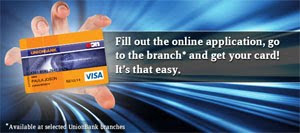
Step 1. Click the image below to get directed to EON's official site.
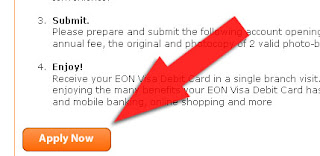
Step 2. At the lower part of the page, click on Apply Now to start your application.
Step 3. Take time to read the Terms and Conditions that will pop up, then click I agree with the terms and conditions stated above button.
Step 4. Fill out the form at the Create New Account page. All fields are required.
Important! Choose the nearest UnionBank branch as your Pickup Branch.
Step 5. Enter the Verification Code correctly. Then click the Submit button.
An SMS and an email will be sent to you stating your reference number, selected pick up branch, and other instructions.
What you will need to bring when you go to your chosen UnionBank branch to pick up your EON Visa Debit Card:
1. P350 for your first annual fee
2. Original and photocopy of 2 valid photo-bearing IDs. Here are the list of valid IDs:
When I applied for my EON, it only took 3 to 5 minutes for them to print the card! The staff is also very accommodating, because I forgot to photocopy my IDs, but she said that it is fine and she even scanned my IDs for me! That was at the Shangrila branch =)
A sealed paper will be given to you together with your EON Visa Debit Card. It contains your unique 4-digit PIN. Look for a UnionBank ATM and immediately change your PIN, and be sure to memorize your new PIN.
It usually takes 24 hours before your EON gets activated. Then once activated, you can link your EON account to your PayPal account to begin receiving and sending money! =) EON CyberAccount even has a PayPal Guide to provide your more info on how to use your EON with your PayPal account.
To log in to your CyberAccount, click here, the choose EON CyberAccount Login. A new window or tab will open that will direct you to the login page. There, you can make transactions through your account anywhere you are as long as you have internet access. You can also check your balance, and your transaction history.
Enjoy! =)
 deposit account. Application is very easy, and maintaining it is much easier. And with EON Visa Debit Card, you can make banking transactions with just a click of a mouse. Very convenient, isn't it? =)
 Let me state more of EON Visa Debit Card's features:
1. This card is exclusively made for electronic use only. It means no passbooks, or checkbooks. And no transaction slips! A paperless bank account it is. You can do your banking transactions at home, or anywhere in the world where internet access is available.
2. EON Visa Debit Card has no maintaining balance. Need I say more? =)
3. And yes, I know you have been waiting for this, you can use your EON Visa Debit Card to verify your PayPal account! You can use your EON to fund your PayPal account, and likewise, you can withdraw your PayPal funds through your EON.
Like I said, it is very easy to apply for an EON Visa Debit Card, because you can even do it online! Just go to their site, and fill out the form. Then an email and SMS will be sent to you with other instructions as to how to claim your card. You will be required to make a personal appearance on one of UnionBank's branches. Limited branches are available as of now, but as mentioned in their website, more pick-up branches will be available soon.
Here is your step-by-step guide:
Step 1. Click the image below to get directed to EON's official site.
Step 2. At the lower part of the page, click on Apply Now to start your application.

Step 3. Take time to read the Terms and Conditions that will pop up, then click I agree with the terms and conditions stated above button.
Step 4. Fill out the form at the Create New Account page. All fields are required.
Important! Choose the nearest UnionBank branch as your Pickup Branch.
Step 5. Enter the Verification Code correctly. Then click the Submit button.
An SMS and an email will be sent to you stating your reference number, selected pick up branch, and other instructions.
What you will need to bring when you go to your chosen UnionBank branch to pick up your EON Visa Debit Card:
1. P350 for your first annual fee
2. Original and photocopy of 2 valid photo-bearing IDs. Here are the list of valid IDs:
- Passport
- Driver’s License
- Permit to Carry Firearms
- New Social Security System (SSS) card
- Government Services Insurance System (GSIS) e-card
- Professional Regulation Commission (PRC) ID
- New Tax Identification Number (TIN)
- Original and unexpired National Bureau of Investigation (NBI) clearance
- Police Clearance
- PhilHealth card
- Office of Senior Citizen Affairs (OSCA)/ Senior Citizen card
- Card Postal ID
- Barangay certification
- Current School ID for students
When I applied for my EON, it only took 3 to 5 minutes for them to print the card! The staff is also very accommodating, because I forgot to photocopy my IDs, but she said that it is fine and she even scanned my IDs for me! That was at the Shangrila branch =)
A sealed paper will be given to you together with your EON Visa Debit Card. It contains your unique 4-digit PIN. Look for a UnionBank ATM and immediately change your PIN, and be sure to memorize your new PIN.
It usually takes 24 hours before your EON gets activated. Then once activated, you can link your EON account to your PayPal account to begin receiving and sending money! =) EON CyberAccount even has a PayPal Guide to provide your more info on how to use your EON with your PayPal account.
To log in to your CyberAccount, click here, the choose EON CyberAccount Login. A new window or tab will open that will direct you to the login page. There, you can make transactions through your account anywhere you are as long as you have internet access. You can also check your balance, and your transaction history.
Enjoy! =)
How To Sign Up for a PayPal Account
Having a payment processor is a vital part in earning money online, because here is where your payments will go. One of the most reliable payment processor is PayPal, and is my most favorite. PayPal is used by individuals and business all over the world to send and receive money through the Internet.
A short run-down why I highly recommend that you use PayPal:
Click the PayPal logo to go to the site, and start your free registration.

A short run-down why I highly recommend that you use PayPal:
- It’s Fast – Payments are made immediately, making it quicker than sending checks or money orders.
- It’s Private – PayPal will never reveal your financial information to sellers.
- It’s Global – PayPal is accepted worldwide, and can be used to make payments locally or internationally.
- It’s Easy – You can send money to anyone in the world with just a few clicks.
- It’s Trusted – Industry-leading fraud prevention keeps you safe and secure.
- It’s Cost-Effective – It’s free to send money, and PayPal is affordable for businesses of all sizes.
Click the PayPal logo to go to the site, and start your free registration.
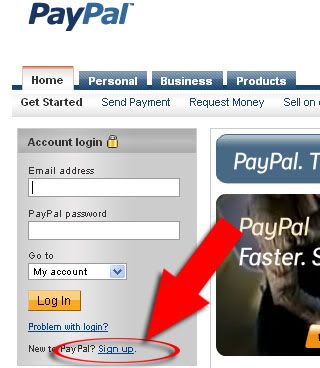
Step 1. Click on the Sign up link at the bottom of the Account login boxes, as shown in the image below.
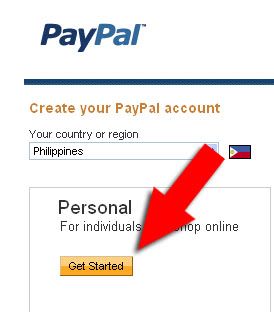
Step 2. On Create your PayPal account page, choose your country or region. Please select only the correct country or region you belong into so as not to create any problems in the future. A Personal account would be just fine to register in for your online money making, then click Get Started.
Step 3. Fill out the form with your correct information. Rest assured that any information that you provide will be secured with PayPal. You can skip the Credit Card information part for now if you don’t have one yet. Then click Save and Continue to proceed.
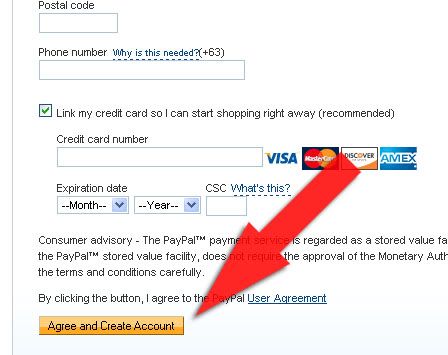


Then you're set! =)
Tip: Always check your registered email, because there you will be updated whenever a transaction was made through your PayPal account. Your registered email is what you put as the payment processor on your Paid-to-Click sites (when PayPal is honored on that site, that is).
ClixSense - Most Trusted PTC!
Most trusted PTC online!
Click Here to Join ClixSense for FREE!How to earn in ClixSense:
1. Clicking the advertisements - there are about 15 to 20 ads available to click per day, ranging from $0.001 to $0.02 per ad click.
2. ClixGrid - you have 25 chances, or 50 if you're a Premium member, of getting up to $5.00.
3. Tasks and Offers - a newly added feature in ClixSense, members can now complete various tasks and offers in exchange of cash!
4. Commissions from your downlines - ClixSense has a great affiliate system that lets you earn from your referrals up to 8 levels deep!
Types of Advertisements:
Ad Type
|
Timer (Seconds)
|
Micro
|
3
|
Mini
|
15
|
Standard
|
30
|
Extended
|
60
|
How to maximize your earning potential with ClixSense:
1. Download the ClixSense toolbar. This will help you know if there are new ads available to click. It means that you will never miss an ad!
2. Always, I mean always, play the ClixGrid - because you can earn from $0.10 up to $5.00 here! That is extra cash, straight to your account!
3. Complete tasks and offers. This is a new earning feature of ClixSense. You can perform different tasks, and accept various offers for, of course, a price! =)
4. Upgrade to Premium! It only costs $17.00 to upgrade in ClixSense, and that is already for one whole year. Why upgrade?
- First, you will receive 1000 welcome ad credits for you to promote your business on the ClixSense Website!
- More ads to click! A premium member is guaranteed 4 Premium ads per day, but it is usually more than that. It really depends on how active you are online, like how much time are you online in a day. This is also another reason why you should download the ClixSense Toolbar, to be notified first-hand if new ads are available to be clicked. =)
- Minimum payout amount is reduced to $6.00 so you can withdraw your money right away!
- More chances of winning in ClixGrid, while cutting the timer in half. You have additional 25 chances to play the Grid, and that's double the chances of getting the $5.00 top prize!
- Now, with ClixSense's Daily Checklist Bonus, a Premium member gets 10% of his/her earnings for the day, compared to only 5% if you're a regular member.
- Higher downline click commission, compared if you are only a Standard member. Details below.
- Get sign-up commissions from your referrals.
- 8-Tier affiliate program that pays you for each referral that also upgrades to PREMIUM.
Referrals (How to earn from them):Basic info: ClixSense does not require its members to click everyday to be able to earn from their referrals' clicks. It means you have more time to advertise your link, get more referrals, and earn bigger! But remember to keep your ClixSense account active by logging in every 90 days.
However, it is still advisable to be an active clicker in ClixSense especially if you are still a newbie, since you will most likely rely on your own clicks at first =)
1. Each time your direct referral click an ad, not only do they earn from, but you get paid too! So the more referrals you have, the higher your earnings!
Ad Type
|
Standard
|
Premium
|
Micro
|
$0.0002
|
$0.0004
|
Mini
|
$0.0010
|
$0.0020
|
Standard
|
$0.0020
|
$0.0040
|
Extended
|
$0.0040
|
$0.0080
|
2. If you are a Premium member, you also get earn from your referral through a sign-up commission. You earn $0.25 if your referral earned worth $1.00 of PTC ad clicks.
3. You earn from your referrals' purchases, like Ad credits or ClixGrid links, if your referral would like to advertise in ClixSense. Commissions differ depending on your account type.
Standard
|
Premium
| |
Commission per Purchase
|
10% up to $1.00
|
10% up to $2.00
|
Limit per Referral
|
$50.00
|
$100.00
|
4. You also get paid whenever your referrals upgrade their membership to Premium! And commissions also varies depending on your account type. Both account types will receive $2.00 when a direct referral upgraded to Premium membership, but only a Premium member will get a commission of $1.00 if a level 2 downline (the referral of your referral) upgraded the account, up to level 8.
Standard
|
Premium
| |
Level #1
|
$2.00
|
$2.00
|
Level #2
|
-
|
$1.00
|
Level #3
|
-
|
$1.00
|
Level #4
|
-
|
$1.00
|
Level #5
|
-
|
$1.00
|
Level #6
|
-
|
$1.00
|
Level #7
|
-
|
$1.00
|
Level #8
|
-
|
$1.00
|
Minimum payout amount in ClixSense is $8.00, which is very easy to reach given the many ways of earning in this site.
ClixSense pays through PayPal, AlertPay, Liberty Reserve, and Check.
PayPal, AlertPay and Liberty Reserve cashouts are sent once a week on Mondays, so please make sure you request your cashout before Monday.
Checks are mailed only once a month on the first Monday to the postal address on your profile, so make sure that info on your profile is correct. Also, Checks are only valid for a period of 60 days from the date of issuance. You should be able to encash it within 60 days or else it will be subject for cancellation.
Method
|
Minimum Cashout
|
Fee
|
When
|
PayPal
|
$8.00
|
2% up to $1-20
|
Weekly on Mondays
|
Payza
|
$8.00
|
2.5% + $0.25 up to $4.25
|
Weekly on Mondays
|
Liberty Reserve
|
$15.00
|
$0.25
|
Weekly on Mondays
|
Check
|
$10.00
|
$1.50
|
Monthly on First Monday
|
(U.S., CND, MX)
| |||
Check (Int'l)
|
$100.00
|
$2.00
|
Monthly on First Monday
|
(Other Countries)
|
Subscribe to:
Posts (Atom)