Showing posts with label paypal. Show all posts

How To Apply for an EON Visa Debit Card (Philippines)

A real blessing to all Pinoy online money makers is EON Visa Debit Card! It is UnionBank's internet-based deposit account. Application is very easy, and maintaining it is much easier. And with EON Visa Debit Card, you can make banking transactions with just a click of a mouse. Very convenient, isn't it? =)

Let me state more of EON Visa Debit Card's features:


1. This card is exclusively made for electronic use only. It means no passbooks, or checkbooks. And no transaction slips! A paperless bank account it is. You can do your banking transactions at home, or anywhere in the world where internet access is available.


2. EON Visa Debit Card has no maintaining balance. Need I say more? =)


3. And yes, I know you have been waiting for this, you can use your EON Visa Debit Card to verify your PayPal account! You can use your EON to fund your PayPal account, and likewise, you can withdraw your PayPal funds through your EON.


Like I said, it is very easy to apply for an EON Visa Debit Card, because you can even do it online! Just go to their site, and fill out the form. Then an email and SMS will be sent to you with other instructions as to how to claim your card. You will be required to make a personal appearance on one of UnionBank's branches. Limited branches are available as of now, but as mentioned in their website, more pick-up branches will be available soon.

Here is your step-by-step guide:

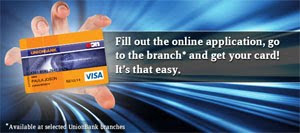
Step 1. Click the image below to get directed to EON's official site.

Step 2. At the lower part of the page, click on Apply Now to start your application.


Step 3. Take time to read the Terms and Conditions that will pop up, then click I agree with the terms and conditions stated above button.

Step 4. Fill out the form at the Create New Account page. All fields are required.

Important! Choose the nearest UnionBank branch as your Pickup Branch.

Step 5. Enter the Verification Code correctly. Then click the Submit button.

An SMS and an email will be sent to you stating your reference number, selected pick up branch, and other instructions.


What you will need to bring when you go to your chosen UnionBank branch to pick up your EON Visa Debit Card:

1. P350 for your first annual fee
2. Original and photocopy of 2 valid photo-bearing IDs. Here are the list of valid IDs:
  • Passport
  • Driver’s License
  • Permit to Carry Firearms
  • New Social Security System (SSS) card
  • Government Services Insurance System (GSIS) e-card
  • Professional Regulation Commission (PRC) ID
  • New Tax Identification Number (TIN)
  • Original and unexpired National Bureau of Investigation (NBI) clearance
  • Police Clearance
  • PhilHealth card
  • Office of Senior Citizen Affairs (OSCA)/ Senior Citizen card
  • Card Postal ID
  • Barangay certification
  • Current School ID for students
3. Your initial deposit. This is not actually required, but it is recommended so that you can start using your EON account.

When I applied for my EON, it only took 3 to 5 minutes for them to print the card! The staff is also very accommodating, because I forgot to photocopy my IDs, but she said that it is fine and she even scanned my IDs for me! That was at the Shangrila branch =)

A sealed paper will be given to you together with your EON Visa Debit Card. It contains your unique 4-digit PIN. Look for a UnionBank ATM and immediately change your PIN, and be sure to memorize your new PIN.

It usually takes 24 hours before your EON gets activated. Then once activated, you can link your EON account to your PayPal account to begin receiving and sending money! =) EON CyberAccount even has a PayPal Guide to provide your more info on how to use your EON with your PayPal account.

To log in to your CyberAccount, click here, the choose EON CyberAccount Login. A new window or tab will open that will direct you to the login page. There, you can make transactions through your account anywhere you are as long as you have internet access. You can also check your balance, and your transaction history.

Enjoy! =)

How To Sign Up for a PayPal Account

Having a payment processor is a vital part in earning money online, because here is where your payments will go. One of the most reliable payment processor is PayPal, and is my most favorite. PayPal is used by individuals and business all over the world to send and receive money through the Internet.

A short run-down why I highly recommend that you use PayPal:

  • It’s Fast – Payments are made immediately, making it quicker than sending checks or money orders.
  • It’s Private – PayPal will never reveal your financial information to sellers.
  • It’s Global – PayPal is accepted worldwide, and can be used to make payments locally or internationally.
  • It’s Easy – You can send money to anyone in the world with just a few clicks.
  • It’s Trusted – Industry-leading fraud prevention keeps you safe and secure.
  • It’s Cost-Effective – It’s free to send money, and PayPal is affordable for businesses of all sizes.

Click the PayPal logo to go to the site, and start your free registration.

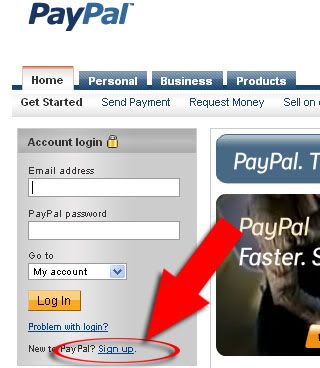
Step 1. Click on the Sign up link at the bottom of the Account login boxes, as shown in the image below.


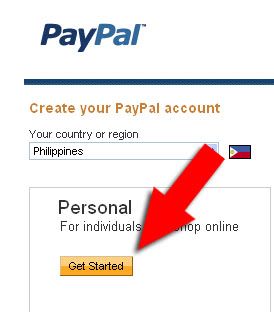
Step 2. On Create your PayPal account page, choose your country or region. Please select only the correct country or region you belong into so as not to create any problems in the future. A Personal account would be just fine to register in for your online money making, then click Get Started.


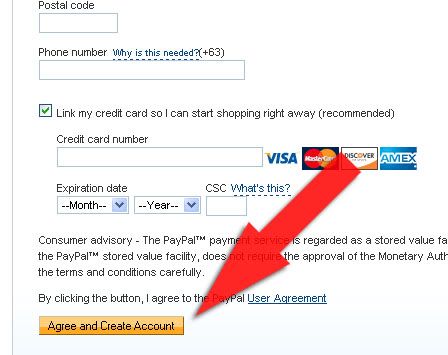
Step 3. Fill out the form with your correct information. Rest assured that any information that you provide will be secured with PayPal. You can skip the Credit Card information part for now if you don’t have one yet. Then click Save and Continue to proceed.


Then you're set! =)

Tip: Always check your registered email, because there you will be updated whenever a transaction was made through your PayPal account. Your registered email is what you put as the payment processor on your Paid-to-Click sites (when PayPal is honored on that site, that is).

Newbie Strategy

If it is your first time to make money online, you can consider your self as a Newbie in this business. Here are some pointers to help you get started:

1. Pick sites that have low minimum payouts, such as $3 or lower, because it still difficult to reach higher payouts at this level, and you only have to rely on your personal clicking.

2. Get as many information as you can about the Paid-To-Click Program; the most trusted sites, the paying sites, and the scam sites.

3. And if you think that a particular site is a good site, invest your first payout in that site. Upgrade your membership for more ads to click and higher pay for each click. You can also purchase referrals, wherein they give to you other members that don't have referrers as your downline. Or you can place an ad in their site for it to get traffic and potential referrals.

4. For you to earn more, you have to have atleast 10 PTC sites that have atleast 5+ ads everyday.

5. Click everyday. And as much as possible, refer everyday.

PTC Common Terms

If you're a beginner in PTC programs, it's possible to be confused of all the unfamiliar terms that you encounter. For a better understanding of what PTC is all about and for you to know what exactly are you getting into, here are some common terminologies that you might come across:

PTC site - A site that gives its members an opportunity to make money online by clicking or browsing on their advertisements. Most sites pay about $0.01 per click. A lot of PTC sites exist on the Internet today, and you can join as many as like, just be aware of the Scam Sites! However, only one account is allowed per person because there really is no reason for another account.

Member - That's you. You registered on the site, so you're the member. To your referrals, you are the "upline or referrer".

Referrals - Other members that joined the site using your referral link.

Referral link - The unique URL provided by the PTC site that is automatically generated when you became a member. It is located in the Member's Area, just copy and paste it to use as your link.

Promoter - These are members, like you, that promote the PTC site through their personal referral links.

Downline - Your referrals, collectively. These people are very important to you. They are your money makers, so to speak. You earn for their every click.

Minimum Cash out or Pay out - The minimum amount required before you can request for your money. Most PTC sites pay through AlertPay and PayPay (both with FREE registration).

Upgrades - An option for every member to raise their earnings. Upgraded members are provided with more ads to click, sometimes a lower cash out amount, and faster payment processing.